
Download the reference guide (PDF)
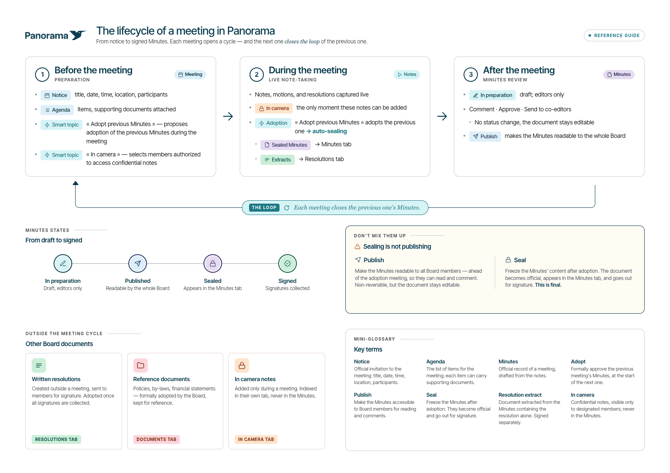
Each meeting in Panorama follows a three-phase cycle: preparation before the meeting, live note-taking, and minutes review. What makes this cycle unique: each meeting closes the minutes of the previous one.
Before the meeting: Preparation
Two documents structure the preparation of each meeting:
- The notice: the official invitation that includes the meeting title, date, time, location, and list of participants.
- The agenda: the list of topics to be discussed. Each item can include context documents attached directly.
Smart topics are available to automate certain recurring actions. This article focuses on two of them:
- "Adoption of last minutes": automatically proposes the adoption of the previous meeting's minutes during the meeting.
- "In camera": allows you to select which members are authorized to add and access confidential notes.
During the meeting: Live note-taking
During the meeting, notes, motions, and resolutions are recorded live in Panorama.
In camera notes can only be added during the meeting.
The adoption of the previous minutes is handled using the corresponding smart topic. When the minutes are adopted, they are automatically sealed, then appear in the "Minutes" tab. Resolution extracts are simultaneously indexed in the "Resolutions" tab. All of these documents are also automatically sent for signature at the end of the meeting.
After the meeting: Minutes review
After the meeting, the minutes go through several states before being definitively signed.
Minutes states
| State | What it means |
|---|---|
| In preparation | Draft; visible to reviewers only |
| Published | Readable by all board members |
| Sealed | Appears in the "Minutes" tab; sent for signature |
| Signed | Signatures collected; document finalized |
During the "In preparation" phase, you can comment, validate, and send the document to co-reviewers.
Validate the minutes
Validating the minutes doesn't block anything and doesn't change their state. This action only keeps a record of who approved the draft, and when. Each validation is logged in the platform and it shows how many reviewers have validated. The minutes remain editable after a validation.
Publish the minutes
Clicking "Publish" makes the minutes readable by all board members, before the adoption meeting, so they can read and comment on them. The document remains editable.
Not to be confused: sealing is not publishing
Publish makes the minutes readable by board members for review and comments. The action is not reversible, but the document remains editable.
Seal freezes the content of the minutes. The document becomes official, appears in the "Minutes" tab, and is sent for signature. This action is final.
Parallel flows: Outside the cycle
Some board documents exist outside the meeting cycle.
Written resolutions
Created outside of meetings and sent to members for signature. Adopted once all signatures are collected. Accessible in the "Resolutions" tab.
Reference documents
Policies, by-laws, financial statements, etc. Often formally adopted by the board and kept for reference. Accessible in the "Documents" tab.
In camera notes
Added only during the meeting. Indexed in the "In camera" tab and never included in the minutes.
Glossary
| Term | Definition |
|---|---|
| Notice | Official invitation to the meeting: title, date, time, location, participants. |
| Agenda | The list of topics for the meeting; each item can include documents. |
| Minutes | Official record of a meeting, generated from notes. |
| Adopt | Formally approve the previous meeting's minutes at the start of the next one. |
| Publish | Make the minutes accessible to board members for review and comments. |
| Seal | Freeze the minutes. They become official and are sent for signature. |
| Validate | Record that a reviewer approved the minutes draft. Doesn't change its state or block anything; only serves as a trace (who validated, and when). |
| Resolution extract | Document extracted from the minutes containing the resolution only. Signed separately. |
| In camera | Confidential notes, visible only to designated members; never included in the minutes. |