
Any minutes, even if not validated by all reviewers, can be adopted by the board of directors. Learn more about reviewing minutes →
Preparing the agenda
The "Past Minutes Adoption" smart topic is added by default to the agenda when you create a meeting. Panorama automatically shows all minutes pending adoption.
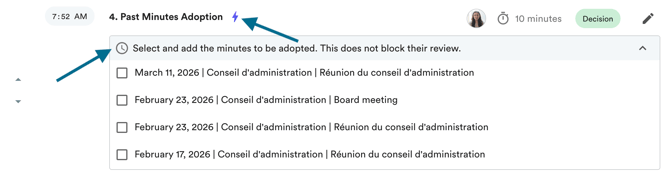
Make sure to check the minutes to be adopted and the reports to be presented. Documents added to this topic will remain editable until they are adopted at the meeting.
Committee reports: your bylaws should specify whether committee reports need to be adopted by the board, at the committee level, or if no adoption is required. If you do not need to adopt them at a meeting, you can seal them directly. Learn more →
Adopting the minutes at the meeting
During the meeting, record the adoption motion to seal the selected minutes. Learn more about taking notes at a meeting →
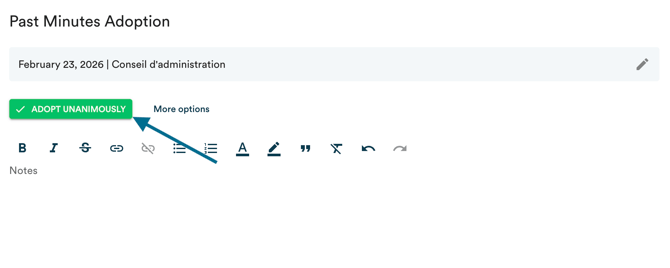
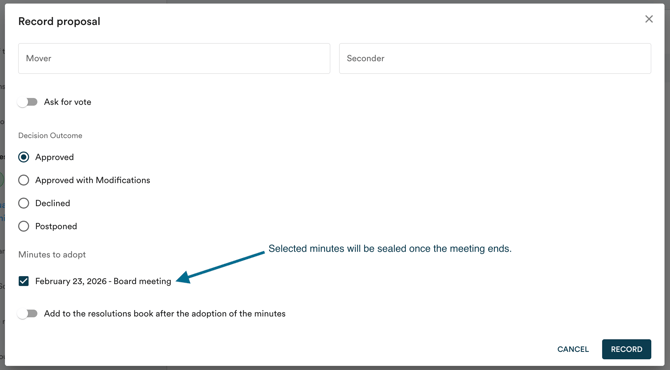
Once adopted, the document is sealed and can no longer be edited, even if the motion was adopted with modifications.