---
title: How to view and filter your follow-ups
description: Learn how to view and filter your centralized follow-up list in Panorama to keep a clear view of your board's commitments.
---
[Skip to content](https://support.usepanorama.com/en-ca/how-to-view-and-filter-your-follow-ups#main-content)
English - Canada
Show submenu for translations
[](https://support.usepanorama.com/en-ca?hsLang=en-ca)
Open main navigation
Close main navigation
- English - Canada
Show submenu for translations
- [Contact us](https://survey.hsforms.com/20YRr1W_JSH-_HpRzX5n_Qgcwv7u)
[Contact us](https://survey.hsforms.com/20YRr1W_JSH-_HpRzX5n_Qgcwv7u)
How can we help you?
- There are no suggestions because the search field is empty.
1. [Panorama Help Center](https://support.usepanorama.com/en-ca?hsLang=en-ca)
2. [Follow-ups](https://support.usepanorama.com/en-ca/follow-ups?hsLang=en-ca)
# How to view and filter your follow-ups
## Find all your follow-ups at a glance, no matter where they came from.
All your follow-ups, whether they come from a meeting, the minutes, or a manual entry, are gathered in a single centralized list.
1. Go to the "**Follow-ups**" tab in the main menu.

2. View the full list of your follow-ups, along with their owner, due date, and status.
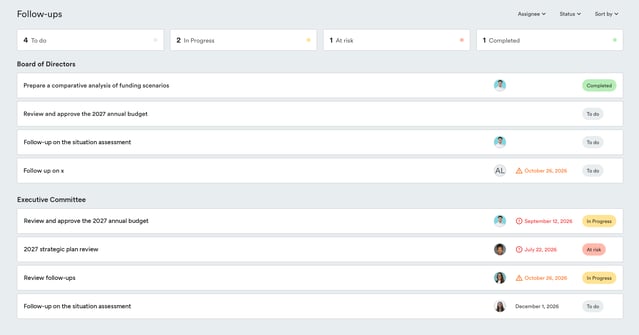
3. Use the filters at the top of the list to display, for example, only your open follow-ups, overdue follow-ups, or those assigned to a specific person.

This same page also lets you :
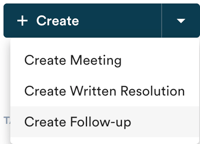
- Create a new follow-up manually
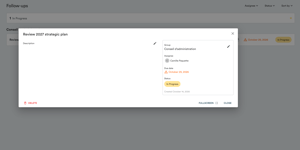
- Open a follow-up to edit it
- Complete or archive a follow-up directly from the list
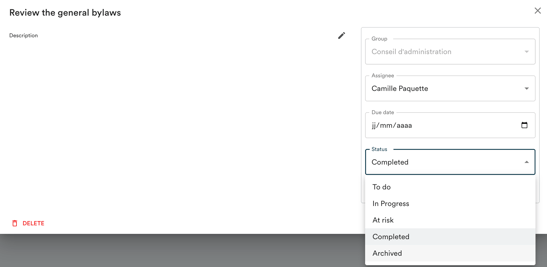
Learn more about closing and archiving a follow-up →
- [Guides](https://support.usepanorama.com/en-ca/guides?hsLang=en-ca#main-content)
- [Members of the Board](https://support.usepanorama.com/en-ca/guides?hsLang=en-ca#members-of-the-board)
- [Management team](https://support.usepanorama.com/en-ca/guides?hsLang=en-ca#management-team)
- [Account](https://support.usepanorama.com/en-ca/account?hsLang=en-ca)
- [Troubleshooting](https://support.usepanorama.com/en-ca/troubleshooting?hsLang=en-ca)
- [Meetings](https://support.usepanorama.com/en-ca/meetings?hsLang=en-ca#main-content)
- [Get ready for a meeting](https://support.usepanorama.com/en-ca/meetings?hsLang=en-ca#get-ready-for-a-meeting)
- [Create and manage the meeting](https://support.usepanorama.com/en-ca/meetings?hsLang=en-ca#create-and-manage-the-meeting)
- [Manage documents](https://support.usepanorama.com/en-ca/meetings?hsLang=en-ca#manage-documents)
- [Annual general meeting](https://support.usepanorama.com/en-ca/meetings?hsLang=en-ca#annual-general-meeting)
- [Minutes](https://support.usepanorama.com/en-ca/minutes?hsLang=en-ca)
- [Resolutions](https://support.usepanorama.com/en-ca/resolutions?hsLang=en-ca#main-content)
- [In-meeting resolutions](https://support.usepanorama.com/en-ca/resolutions?hsLang=en-ca#in-meeting-resolutions)
- [Written resolutions](https://support.usepanorama.com/en-ca/resolutions?hsLang=en-ca#written-resolutions)
- [Documents](https://support.usepanorama.com/en-ca/documents?hsLang=en-ca)
- [In camera](https://support.usepanorama.com/en-ca/in-camera?hsLang=en-ca)
- [Organization](https://support.usepanorama.com/en-ca/organization?hsLang=en-ca#main-content)
- [Manage my users](https://support.usepanorama.com/en-ca/organization?hsLang=en-ca#manage-my-users)
- [Manage my committees](https://support.usepanorama.com/en-ca/organization?hsLang=en-ca#manage-my-committees)
- [MinutesIQ](https://support.usepanorama.com/en-ca/minutesiq?hsLang=en-ca#main-content)
- [Get started](https://support.usepanorama.com/en-ca/minutesiq?hsLang=en-ca#get-started)
- [Go deeper](https://support.usepanorama.com/en-ca/minutesiq?hsLang=en-ca#go-deeper)
- [Billing](https://support.usepanorama.com/en-ca/minutesiq?hsLang=en-ca#billing)
- [Troubleshooting](https://support.usepanorama.com/en-ca/minutesiq?hsLang=en-ca#troubleshooting)
- [Follow-ups](https://support.usepanorama.com/en-ca/follow-ups?hsLang=en-ca)
[](http://www.usepanorama.com)
[mailto:email@email.com](mailto:email@email.com)
Copyright © 2026, Panorama