---
title: How to remove a user
description: Learn how to remove a user from your Panorama workspace from the workspace settings, reserved for account owners.
---
[Skip to content](https://support.usepanorama.com/en-ca/how-to-remove-a-user#main-content)
- [English - Canada](https://support.usepanorama.com/en-ca/how-to-remove-a-user)
- [Français - Canada](https://support.usepanorama.com/comment-supprimer-un-utilisateur)
English - Canada
Show submenu for translations
[](https://support.usepanorama.com/en-ca?hsLang=en-ca)
Open main navigation
Close main navigation
- - [English - Canada](https://support.usepanorama.com/en-ca/how-to-remove-a-user)
- [Français - Canada](https://support.usepanorama.com/comment-supprimer-un-utilisateur)
English - Canada
Show submenu for translations
- [Contact us](https://survey.hsforms.com/20YRr1W_JSH-_HpRzX5n_Qgcwv7u)
[Contact us](https://survey.hsforms.com/20YRr1W_JSH-_HpRzX5n_Qgcwv7u)
How can we help you?
- There are no suggestions because the search field is empty.
1. [Panorama Help Center](https://support.usepanorama.com/en-ca?hsLang=en-ca)
2. [Organization](https://support.usepanorama.com/en-ca/organization?hsLang=en-ca)
3. [Manage my users](https://support.usepanorama.com/en-ca/organization?hsLang=en-ca#manage-my-users)
# How to remove a user
## Revoke a member's access to your Panorama workspace.
Only account owners can perform this action.
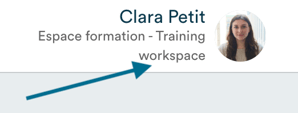
Click on your name in the top right corner of the software.
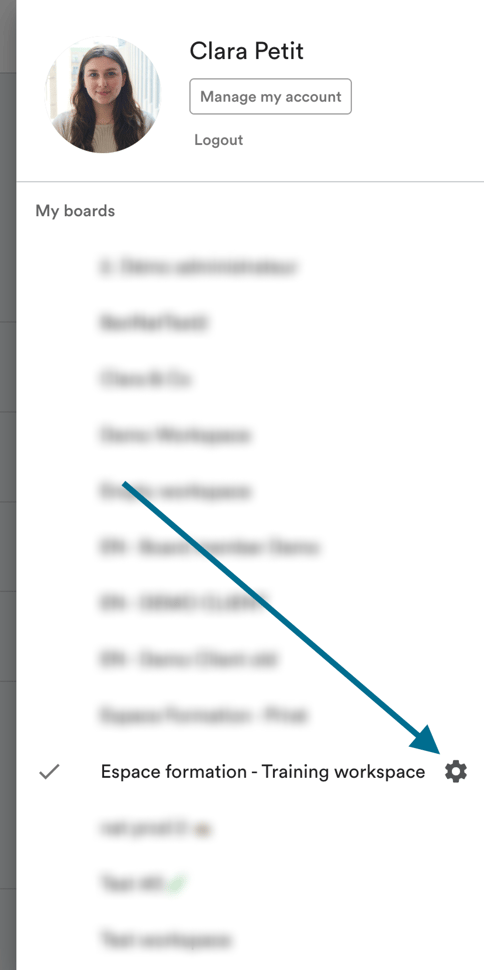
The menu displays all the Panorama workspaces you belong to. Click on the settings icon to the right of the relevant workspace.
Click on "Users and permissions".
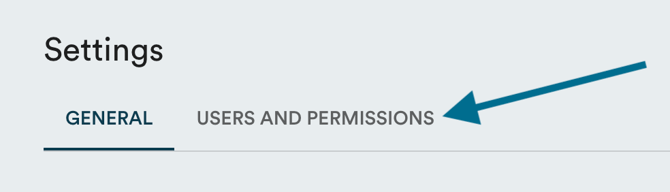
You will see the complete list of users with an account in your workspace.
To remove a user, click on the menu icon (the 3 dots) next to their name, then click "Delete".

- [Guides](https://support.usepanorama.com/en-ca/guides?hsLang=en-ca#main-content)
- [Members of the Board](https://support.usepanorama.com/en-ca/guides?hsLang=en-ca#members-of-the-board)
- [Management team](https://support.usepanorama.com/en-ca/guides?hsLang=en-ca#management-team)
- [Account](https://support.usepanorama.com/en-ca/account?hsLang=en-ca)
- [Troubleshooting](https://support.usepanorama.com/en-ca/troubleshooting?hsLang=en-ca)
- [Meetings](https://support.usepanorama.com/en-ca/meetings?hsLang=en-ca#main-content)
- [Get ready for a meeting](https://support.usepanorama.com/en-ca/meetings?hsLang=en-ca#get-ready-for-a-meeting)
- [Create and manage the meeting](https://support.usepanorama.com/en-ca/meetings?hsLang=en-ca#create-and-manage-the-meeting)
- [Manage documents](https://support.usepanorama.com/en-ca/meetings?hsLang=en-ca#manage-documents)
- [Annual general meeting](https://support.usepanorama.com/en-ca/meetings?hsLang=en-ca#annual-general-meeting)
- [Minutes](https://support.usepanorama.com/en-ca/minutes?hsLang=en-ca)
- [Resolutions](https://support.usepanorama.com/en-ca/resolutions?hsLang=en-ca#main-content)
- [In-meeting resolutions](https://support.usepanorama.com/en-ca/resolutions?hsLang=en-ca#in-meeting-resolutions)
- [Written resolutions](https://support.usepanorama.com/en-ca/resolutions?hsLang=en-ca#written-resolutions)
- [Documents](https://support.usepanorama.com/en-ca/documents?hsLang=en-ca)
- [In camera](https://support.usepanorama.com/en-ca/in-camera?hsLang=en-ca)
- [Organization](https://support.usepanorama.com/en-ca/organization?hsLang=en-ca#main-content)
- [Manage my users](https://support.usepanorama.com/en-ca/organization?hsLang=en-ca#manage-my-users)
- [Manage my committees](https://support.usepanorama.com/en-ca/organization?hsLang=en-ca#manage-my-committees)
- [MinutesIQ](https://support.usepanorama.com/en-ca/minutesiq?hsLang=en-ca#main-content)
- [Get started](https://support.usepanorama.com/en-ca/minutesiq?hsLang=en-ca#get-started)
- [Go deeper](https://support.usepanorama.com/en-ca/minutesiq?hsLang=en-ca#go-deeper)
- [Billing](https://support.usepanorama.com/en-ca/minutesiq?hsLang=en-ca#billing)
- [Troubleshooting](https://support.usepanorama.com/en-ca/minutesiq?hsLang=en-ca#troubleshooting)
- [Follow-ups](https://support.usepanorama.com/en-ca/follow-ups?hsLang=en-ca)
[](http://www.usepanorama.com)
[mailto:email@email.com](mailto:email@email.com)
Copyright © 2026, Panorama