---
title: How to add comments on my meeting documents
description: "Learn how to add comments on your agendas, minutes, and resolutions in Panorama: public, custom, or private visibility."
---
[Skip to content](https://support.usepanorama.com/en-ca/how-to-add-comments-on-my-meeting-documents#main-content)
- [English - Canada](https://support.usepanorama.com/en-ca/how-to-add-comments-on-my-meeting-documents)
- [Français - Canada](https://support.usepanorama.com/comment-ajouter-des-commentaires-sur-mes-documents-de-réunion)
English - Canada
Show submenu for translations
[](https://support.usepanorama.com/en-ca?hsLang=en-ca)
Open main navigation
Close main navigation
- - [English - Canada](https://support.usepanorama.com/en-ca/how-to-add-comments-on-my-meeting-documents)
- [Français - Canada](https://support.usepanorama.com/comment-ajouter-des-commentaires-sur-mes-documents-de-réunion)
English - Canada
Show submenu for translations
- [Contact us](https://survey.hsforms.com/20YRr1W_JSH-_HpRzX5n_Qgcwv7u)
[Contact us](https://survey.hsforms.com/20YRr1W_JSH-_HpRzX5n_Qgcwv7u)
How can we help you?
- There are no suggestions because the search field is empty.
1. [Panorama Help Center](https://support.usepanorama.com/en-ca?hsLang=en-ca)
2. [Meetings](https://support.usepanorama.com/en-ca/meetings?hsLang=en-ca)
3. [Get ready for a meeting](https://support.usepanorama.com/en-ca/meetings?hsLang=en-ca#get-ready-for-a-meeting)
# How to add comments on my meeting documents
## Collaborate directly on your agendas, minutes, and resolutions with topic-level comments.
Panorama lets you add comments on the topics and documents of a meeting without modifying their content. You can share a comment with all members, limit it to specific people, or keep it entirely private. Anyone with access to the document can read and publish comments.
Comments are available on agendas, minutes, and resolutions.
### Add a comment
**On desktop**
1. Open the document (agenda, minutes, or resolution).
2. Locate the comment icon to the right of the relevant topic. A number indicates how many comments have already been published on that topic.
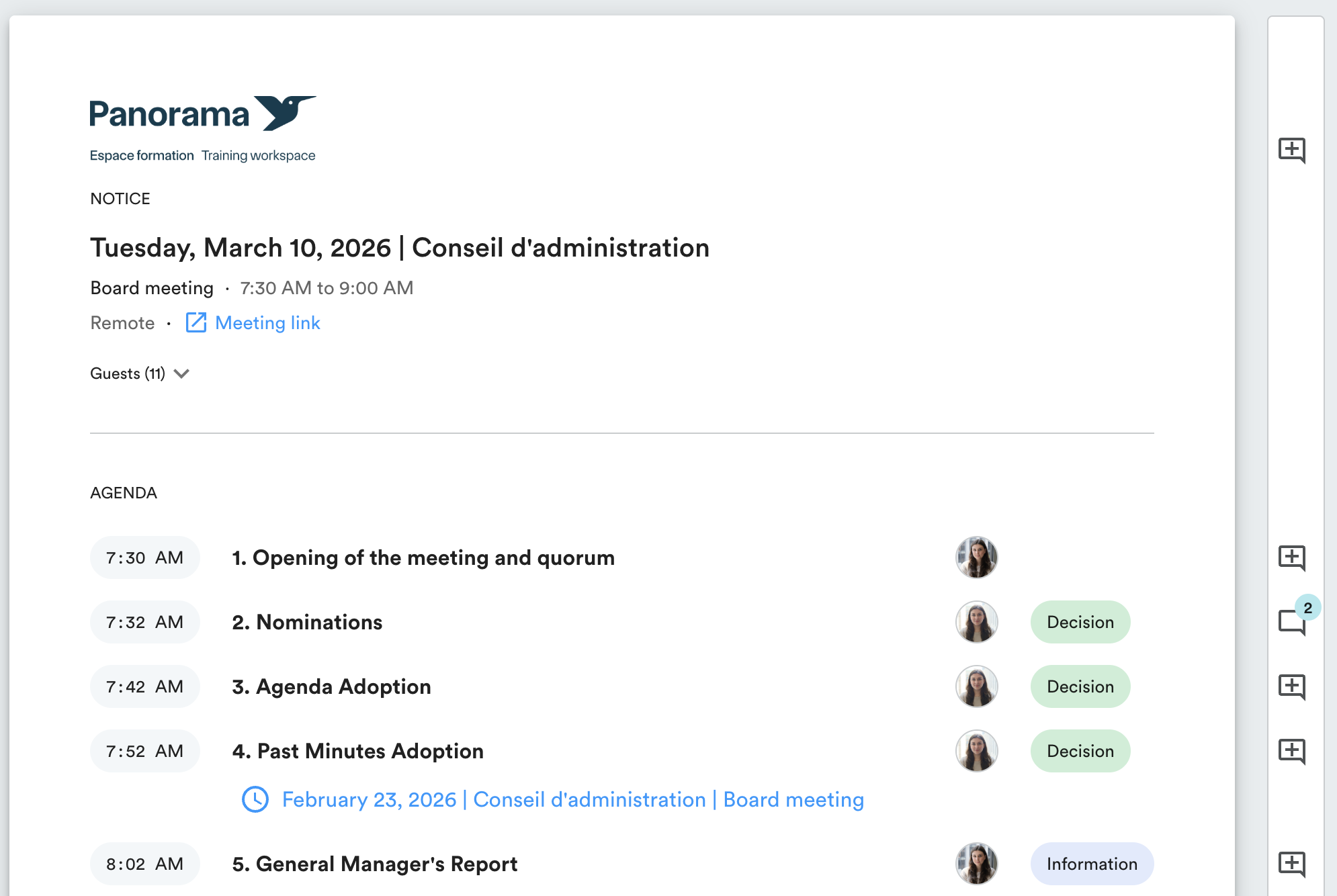
3. Click the icon to open the comments panel.
4. Type your comment in the text field.
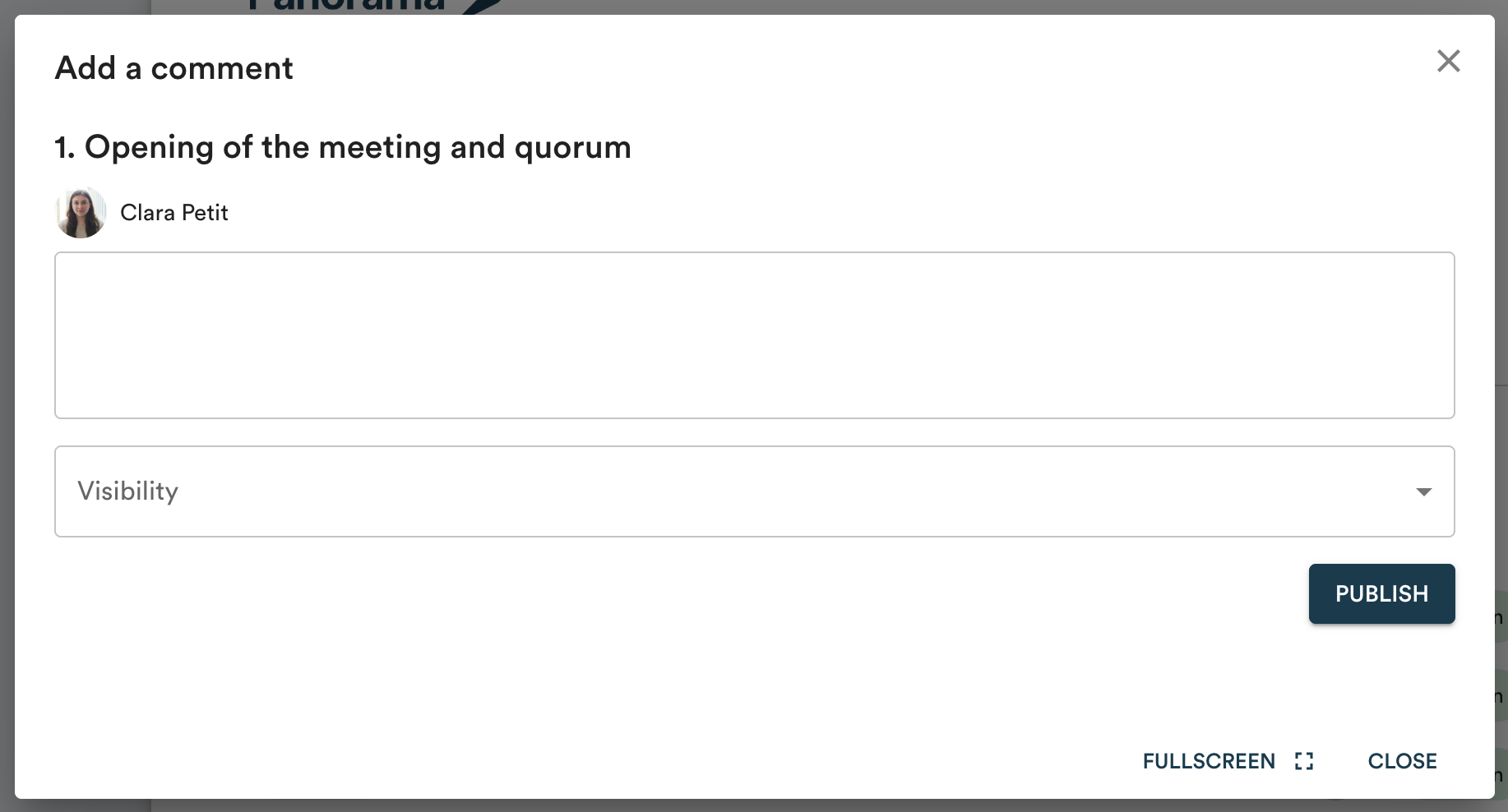
5. In the "Visibility" menu, choose who can see your comment.
6. Click "Publish".
**On mobile**
1. Open the document.
2. Under the relevant topic, click "Comments".
3. Type your comment and select the desired visibility.
4. Click "Publish".
### Comment visibility
When publishing, you choose who can see your comment:
- **Public**: all users with access to the document can read the comment.
- **Custom**: only the users you select from the list can read the comment.
- **Private**: the comment is visible to you only.
### Edit or delete a comment
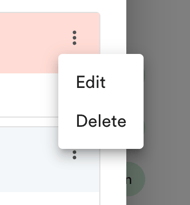
Click the three dots to the right of a comment, then select "Edit" or "Delete".
- [Guides](https://support.usepanorama.com/en-ca/guides?hsLang=en-ca#main-content)
- [Members of the Board](https://support.usepanorama.com/en-ca/guides?hsLang=en-ca#members-of-the-board)
- [Management team](https://support.usepanorama.com/en-ca/guides?hsLang=en-ca#management-team)
- [Account](https://support.usepanorama.com/en-ca/account?hsLang=en-ca)
- [Troubleshooting](https://support.usepanorama.com/en-ca/troubleshooting?hsLang=en-ca)
- [Meetings](https://support.usepanorama.com/en-ca/meetings?hsLang=en-ca#main-content)
- [Get ready for a meeting](https://support.usepanorama.com/en-ca/meetings?hsLang=en-ca#get-ready-for-a-meeting)
- [Create and manage the meeting](https://support.usepanorama.com/en-ca/meetings?hsLang=en-ca#create-and-manage-the-meeting)
- [Manage documents](https://support.usepanorama.com/en-ca/meetings?hsLang=en-ca#manage-documents)
- [Annual general meeting](https://support.usepanorama.com/en-ca/meetings?hsLang=en-ca#annual-general-meeting)
- [Minutes](https://support.usepanorama.com/en-ca/minutes?hsLang=en-ca)
- [Resolutions](https://support.usepanorama.com/en-ca/resolutions?hsLang=en-ca#main-content)
- [In-meeting resolutions](https://support.usepanorama.com/en-ca/resolutions?hsLang=en-ca#in-meeting-resolutions)
- [Written resolutions](https://support.usepanorama.com/en-ca/resolutions?hsLang=en-ca#written-resolutions)
- [Documents](https://support.usepanorama.com/en-ca/documents?hsLang=en-ca)
- [In camera](https://support.usepanorama.com/en-ca/in-camera?hsLang=en-ca)
- [Organization](https://support.usepanorama.com/en-ca/organization?hsLang=en-ca#main-content)
- [Manage my users](https://support.usepanorama.com/en-ca/organization?hsLang=en-ca#manage-my-users)
- [Manage my committees](https://support.usepanorama.com/en-ca/organization?hsLang=en-ca#manage-my-committees)
- [MinutesIQ](https://support.usepanorama.com/en-ca/minutesiq?hsLang=en-ca#main-content)
- [Get started](https://support.usepanorama.com/en-ca/minutesiq?hsLang=en-ca#get-started)
- [Go deeper](https://support.usepanorama.com/en-ca/minutesiq?hsLang=en-ca#go-deeper)
- [Billing](https://support.usepanorama.com/en-ca/minutesiq?hsLang=en-ca#billing)
- [Troubleshooting](https://support.usepanorama.com/en-ca/minutesiq?hsLang=en-ca#troubleshooting)
- [Follow-ups](https://support.usepanorama.com/en-ca/follow-ups?hsLang=en-ca)
[](http://www.usepanorama.com)
[mailto:email@email.com](mailto:email@email.com)
Copyright © 2026, Panorama